
COD Software Pricing: Per Order or Per Shipped Parcel?

When comparing COD management software, the first thing people look at is the displayed price. That is a mistake: two tools at the same price can cost very different amounts depending on what they count. Order received, parcel shipped, user, message… In COD, this billing basis changes everything, because part of the orders never ship.
This guide explains the different pricing models, how to do the maths with your own numbers, and which limits to check before choosing.
The three ways COD software is billed
Per order received. Every order that comes into the tool counts, whether it is confirmed, cancelled or fake. Some tools also count leads, meaning filled-in forms.
Per shipped parcel. Only orders that go out to the shipping company count. A cancelled or unreachable order costs nothing.
Flat fee, with add-ons. A fixed monthly price, with limits (users, WhatsApp numbers, messages, shipping companies) and extra fees when you go over them.
Most tools combine these models: a monthly subscription, plus a volume counted in one of these ways, plus add-ons.
Why the billing basis changes everything in COD
In COD, part of the orders never ship: customers who cancel, fake numbers, unreachable customers, duplicates. If your tool counts orders received, you pay for those too.
An example, with numbers made up for illustration: you receive 1,000 orders in the month, and 600 are confirmed and shipped. Billed per order received, you pay for 1,000 units. Billed per shipped parcel, you pay for 600.
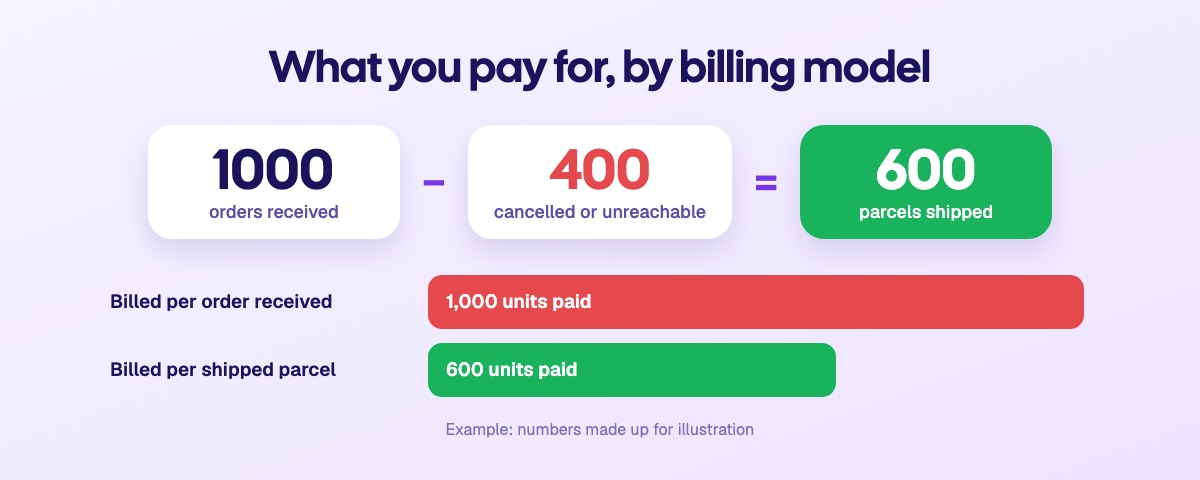
There is a second difference. Per shipped parcel, what you pay follows what you actually sell: a month with many cancellations costs you less. Per order received, a campaign that brings in low-quality orders pushes the bill up without pushing sales up.
Doing the maths with your numbers
Your orders received per month, leads included if the tool counts them.
The share that ends up shipped. Use your own figure from the last few months, not an average found elsewhere.
The plan that matches your volume, and what it costs: subscription, unit price, fees if you go over.
The add-ons you will need: extra users, WhatsApp numbers, messages, shipping companies.
WhatsApp fees, billed by Meta, on top of the tool in every case.
The currency. A price in dollars moves with the exchange rate; a price in dirhams does not.
Do this calculation for your volume today and for the one you are aiming for in a year: a tool that is cheap at the start can become much less so as you grow, and the other way round.
The limits to check
Price does not tell the whole story: every plan has limits. Before choosing, check:
the plan's maximum volume, and what happens if you go over it;
the number of users included;
the number of shipping companies you can connect;
the number of WhatsApp numbers;
the number of automatic messages per month;
the number of stores;
whether the "unlimited" plan has a public price or is quote-only;
whether there is a free plan or a trial, and whether there is a commitment.
A plan limited to two shipping companies, for example, stops you from comparing your shipping companies city by city. See how to choose a COD shipping company.
Sendocki's model
Sendocki bills per shipped parcel. Orders are unlimited on every plan: you only pay when an order becomes a shipment. And the bigger your plan, the lower the price per parcel.
Free | Starter | Growth | Business | |
|---|---|---|---|---|
Subscription | 0 MAD | 49 MAD/month | 149 MAD/month | 399 MAD/month |
Price per shipped parcel | 30 parcels free | 1.00 MAD | 0.80 MAD | 0.65 MAD |
Parcels per month | 30 | Up to 500 | Up to 1,500 | Unlimited |
Shipping companies | 1 | 3 | Unlimited | Unlimited |
Users | 1 | 2 (up to 3) | 5 (up to 10) | 15 (up to 30) |
Automatic messages per month | 50 | 5,000 | 25,000 | Unlimited |
With the example above, 1,000 orders received and 600 parcels shipped, you are on the Growth plan: 149 MAD + 600 × 0.80 MAD = 629 MAD for the month. The 400 cancelled or unreachable orders cost you nothing.
Free plan, with no credit card and no commitment, to test with your real orders.
Prices in dirhams, with no exchange-rate surprises.
Unlimited Business plan with a public price, no quote needed.
WhatsApp included on every plan; messages are billed by Meta directly on your account.
The full details of each plan are on the pricing page. To choose a tool beyond price, see also how to choose COD management software.
Frequently asked questions
Are cancelled orders billed with Sendocki?
No. Only shipped parcels are billed. A cancelled, unreachable or duplicate order costs nothing.
Which model is cheapest?
It depends on your volume and on the share of your orders that ends up shipped. The more cancellations you have, the more billing per shipped parcel works in your favour. Do the maths with your real numbers, for today and for a year from now.
Are WhatsApp fees included in the software price?
Usually not: WhatsApp messages are billed by Meta. Check whether the tool resells them with a margin or whether you pay Meta directly.
Should you take an unlimited plan from the start?
No. Take the plan that matches your current volume, and check that you can move up a plan easily as you grow.
Key takeaways
To compare the price of two COD tools, don't just look at the displayed price: look at what is counted. Billed per order received, you also pay for your cancellations; billed per shipped parcel, you only pay for what goes out. Do the maths with your own numbers, check each plan's limits, and test before you commit.


