
Automate Your COD Store: What to Automate and Which Tool to Use

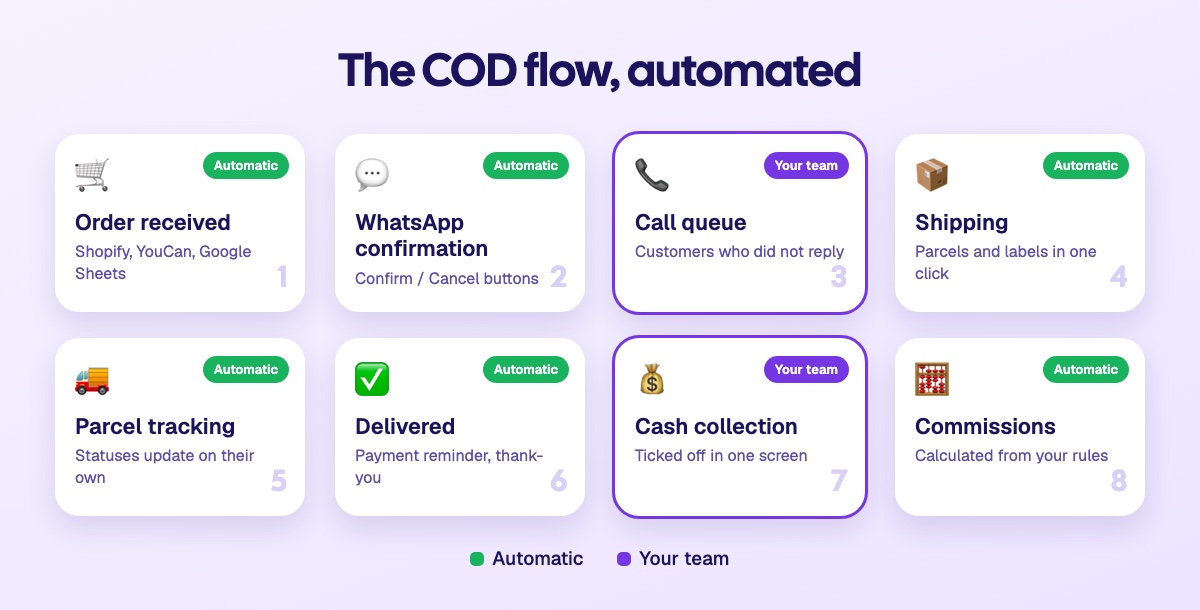
In a COD store, every order goes through the same steps: it comes in, you confirm it, prepare it, hand it to the shipping company, track the parcel and check the cash collection. Done by hand, these steps take hours every day. Automated, they run on their own and your team only handles the exceptions.
This guide reviews what to automate, what is better kept manual, and compares two approaches: building your automations with tools like Zapier or Make, or using a COD tool where they are already built in.
What you can automate, from order to cash collection
Step | By hand | Automated |
|---|---|---|
Order intake | Copy store orders into a spreadsheet | Orders arrive on their own from Shopify, YouCan or Google Sheets |
Confirmation | Call every customer | A WhatsApp message goes out as soon as the order arrives, with Confirm and Cancel buttons |
Customers who don't reply | Keep a call-back list | After the delay you choose, the order moves to the call queue |
Stock | Update a stock spreadsheet | Stock is deducted at the stage you choose |
Shipping | Enter each parcel on the shipping company's website | Parcels, labels and pickup created from your orders, in one click |
Parcel tracking | Check statuses one by one | Statuses come back on their own and the order moves forward |
Customer messages | Write at every shipment | Shipping message, payment reminder, thank-you after delivery |
Commissions | Calculate at month end in a spreadsheet | Calculated from your rules, on every order |
What is better kept manual
Automating does not mean handing everything over. Some tasks need judgement:
calling customers who don't answer messages;
handling an unhappy customer or a dispute;
deciding on a goodwill gesture, a product swap or a cancellation after confirmation;
spotting a suspicious order.
The right goal: your team no longer spends its time on repetitive tasks, and keeps it for these decisions. See also AI agent or human agent: who should confirm your orders.
Option 1: build your automations with Zapier or Make
Zapier and Make connect apps without writing code. The principle is the same: a trigger ("new order on Shopify") starts a series of actions ("send a message", "add a row to Google Sheets"). In Zapier, this series is called a Zap; in Make, a scenario.
They are good, very flexible tools. But for a complete COD flow, you have to assemble everything yourself.
What you have to build
Sending the confirmation message for every order, with a WhatsApp Business API account and templates approved by Meta.
Reading the replies: knowing which button the customer tapped, finding the order and updating its status.
Following up with customers who don't reply, with a delay and a check before sending.
Creating parcels with your shipping company. If it has no ready-made connector in Zapier or Make, you have to use HTTP requests and read its API documentation.
Tracking statuses, by polling the shipping company regularly.
Calculating commissions, often in a separate spreadsheet.
Each point is one more Zap or scenario, with its own settings.
The cost: every action counts
Zapier bills in tasks: each successful action in a Zap uses one. Make bills in credits: each module in a scenario that acts on data uses them. The volume climbs fast with the number of orders.
An example calculation: a scenario that, for each order, sends the WhatsApp message, updates the status, creates the parcel and adds a row to a spreadsheet runs 4 actions. With 1,000 orders a month, that is 4,000 tasks or credits, not counting follow-ups and parcel tracking. For reference, the free plans include 100 tasks a month on Zapier (with Zaps limited to two steps) and 1,000 credits a month on Make, according to their pricing pages checked in October 2026.
Maintenance: the hidden cost
A scenario can stop silently: an expired connection, a renamed field, an API that changes. Meanwhile, orders don't get their confirmation message.
Someone has to watch the error history and fix things, often the person who built it all.
The logic is scattered across several scenarios, a spreadsheet and the shipping companies' websites. Your team can't see an order's status in one place.
Every change (a new stage, a new shipping company) means reworking several scenarios.
Option 2: a COD tool with automation built in
In Sendocki, these automations are part of the tool. There is no scenario to build and no tasks to count:
Your orders arrive on their own from Shopify, YouCan or Google Sheets, in the first stage of your pipeline.
Each stage can trigger a WhatsApp message, and each button in the message sends the order to the stage you choose. Customers who don't reply move to the planned stage after the delay you set.
The call queue gives each agent the next order to confirm, without two agents calling the same customer.
Stock is deducted at the stage you choose.
Your shipping companies are already connected (Sendit, Ameex, Cathedis, Livo): parcels, labels and grouped pickup go out from your orders, and statuses come back on their own.
Commissions are calculated from the rules you set. See confirmation agent commissions.
Everything is in one place: the order, the WhatsApp conversation, the parcel and the cash collection.
For the setup, AIDA, Sendocki's AI assistant, guides you: she prepares your pipeline, your automations and your message templates, and helps you connect your shipping company. And when a customer types a reply instead of tapping a button, KENZI, the AI agent, answers them on WhatsApp.
Zapier, Make or Sendocki: the comparison
Criterion | Zapier or Make | Sendocki |
|---|---|---|
Setup | Built scenario by scenario | Stages and automations to set, with AIDA's help |
Shipping companies in Morocco | HTTP requests if no connector exists | Sendit, Ameex, Cathedis and Livo already connected |
Cost | Grows with the number of actions | No task counter |
Maintenance | Watched and fixed by you | Handled by Sendocki |
Overview | Spread across several tools | Order, message, parcel and cash collection in one place |
Customers' typed replies | Handled by hand | KENZI answers on WhatsApp |
When Zapier or Make are still useful
These tools remain handy for connecting apps that have nothing to do with the order flow: a notification in an internal chat tool, a recruitment form, an accounting update. For the core of the COD flow, from order to cash collection, a dedicated tool saves you from building and maintaining all of this yourself.
Frequently asked questions
Can you automate a COD store without a developer?
Yes. With Zapier or Make, it is possible without code, but building and watching the scenarios takes time. With a COD tool like Sendocki, automations are set from the interface.
How many tasks does one order use in Zapier or Make?
As many as the actions in the scenarios it triggers: one for the message, one for the status update, one for creating the parcel, and so on. Follow-ups and parcel tracking come on top.
What happens if an automation fails?
With Zapier or Make, the error shows up in the scenario's history, and it is up to you to spot it and run it again. In Sendocki, every automatic send appears in the send history, with the order concerned and its status: sent, delivered, replied or failed.
Do you still need a team once everything is automated?
Yes, but a smaller one, focused on what matters: calling customers who don't reply, handling special cases and making decisions. See how to reduce confirmation costs.
Key takeaways
Almost the whole COD flow can run on its own: order intake, WhatsApp confirmation, follow-up, stock, shipping, tracking and commissions. Zapier and Make let you build it, but every action is billed and every scenario needs maintenance. A COD tool with these automations built in spares you that work and keeps everything in one place, so your team can focus on customers.


